同步语音合成 HTTP
使用本接口,在HTTP网络通信协议下进行同步语音合成。备用接口地址
https://api-bj.minimaxi.com/v1/t2a_v2
OpenAPI
api-reference/speech/t2a/api/openapi.json post /v1/t2a_v2
Copy
openapi: 3.1.0
info:
title: MiniMax T2A API
description: >-
MiniMax Text-to-Audio API with support for streaming and non-streaming
output
license:
name: MIT
version: 1.0.0
servers:
- url: https://api.minimaxi.com
security:
- bearerAuth: []
paths:
/v1/t2a_v2:
post:
tags:
- Text to Audio
summary: Text to Audio V2
operationId: t2aV2
parameters:
- name: Content-Type
in: header
required: true
description: 请求体的媒介类型,请设置为 `application/json`,确保请求数据的格式为 JSON
schema:
type: string
enum:
- application/json
default: application/json
requestBody:
description: ''
content:
application/json:
schema:
$ref: '#/components/schemas/T2aV2Req'
examples:
非流式:
value:
model: speech-2.6-hd
text: 今天是不是很开心呀,当然了!
stream: false
voice_setting:
voice_id: male-qn-qingse
speed: 1
vol: 1
pitch: 0
emotion: happy
pronunciation_dict:
tone:
- 处理/(chu3)(li3)
- 危险/dangerous
audio_setting:
sample_rate: 32000
bitrate: 128000
format: mp3
channel: 1
subtitle_enable: false
流式:
value:
model: speech-2.6-hd
text: 今天是不是很开心呀,当然了!
stream: true
voice_setting:
voice_id: male-qn-qingse
speed: 1
vol: 1
pitch: 0
emotion: happy
pronunciation_dict:
tone:
- 处理/(chu3)(li3)
- 危险/dangerous
audio_setting:
sample_rate: 32000
bitrate: 128000
format: mp3
channel: 1
subtitle_enable: false
required: true
responses:
'200':
description: ''
content:
application/json:
schema:
$ref: '#/components/schemas/T2aV2Resp'
examples:
非流式:
value:
data:
audio: <hex编码的audio>
status: 2
extra_info:
audio_length: 9900
audio_sample_rate: 32000
audio_size: 160323
bitrate: 128000
word_count: 52
invisible_character_ratio: 0
usage_characters: 26
audio_format: mp3
audio_channel: 1
trace_id: 01b8bf9bb7433cc75c18eee6cfa8fe21
base_resp:
status_code: 0
status_msg: success
流式:
value:
- data:
audio: hex编码的audio_chunk1
status: 1
trace_id: 01b8bf9bb7433cc75c18eee6cfa8fe21
base_resp:
status_code: 0
status_msg: ''
- data:
audio: hex编码的audio_chunk2
status: 1
trace_id: 01b8bf9bb7433cc75c18eee6cfa8fe21
base_resp:
status_code: 0
status_msg: ''
- data:
audio: hex编码的audio
status: 2
extra_info:
audio_length: 6931
audio_sample_rate: 32000
audio_size: 111789
bitrate: 128000
word_count: 112
invisible_character_ratio: 0
usage_characters: 112
audio_format: mp3
audio_channel: 1
trace_id: 04ece790375f3ca2edbb44e8c4c200bf
base_resp:
status_code: 0
status_msg: success
text/event-stream:
schema:
$ref: '#/components/schemas/T2aV2Resp'
examples:
流式:
value:
- data:
audio: hex编码的audio_chunk1
status: 1
trace_id: 01b8bf9bb7433cc75c18eee6cfa8fe21
base_resp:
status_code: 0
status_msg: ''
- data:
audio: hex编码的audio_chunk2
status: 1
trace_id: 01b8bf9bb7433cc75c18eee6cfa8fe21
base_resp:
status_code: 0
status_msg: ''
- data:
audio: hex编码的audio
status: 2
extra_info:
audio_length: 6931
audio_sample_rate: 32000
audio_size: 111789
bitrate: 128000
word_count: 112
invisible_character_ratio: 0
usage_characters: 112
audio_format: mp3
audio_channel: 1
trace_id: 04ece790375f3ca2edbb44e8c4c200bf
base_resp:
status_code: 0
status_msg: success
components:
schemas:
T2aV2Req:
type: object
required:
- model
- text
properties:
model:
type: string
description: >-
请求的模型版本,可选范围:`speech-2.6-hd`, `speech-2.6-turbo`, `speech-02-hd`,
`speech-02-turbo`, `speech-01-hd`, `speech-01-turbo`.
enum:
- speech-2.6-hd
- speech-2.6-turbo
- speech-02-hd
- speech-02-turbo
- speech-01-hd
- speech-01-turbo
text:
type: string
description: >-
需要合成语音的文本,长度限制小于 10000 字符,若文本长度大于 3000 字符,推荐使用流式输出
- 段落切换用换行符标记
- 停顿控制:支持自定义文本之间的语音时间间隔,以实现自定义文本语音停顿时间的效果。使用方式:在文本中增加`<#x#>`标记,`x`
为停顿时长(单位:秒),范围 [0.01,
99.99],最多保留两位小数。文本间隔时间需设置在两个可以语音发音的文本之间,不可连续使用多个停顿标记
stream:
type: boolean
description: 控制是否流式输出。默认 false,即不开启流式
stream_options:
$ref: '#/components/schemas/T2AStreamOption'
voice_setting:
$ref: '#/components/schemas/T2AVoiceSetting'
audio_setting:
$ref: '#/components/schemas/T2AAudioSetting'
pronunciation_dict:
$ref: '#/components/schemas/PronunciationDict'
timber_weights:
type: array
items:
$ref: '#/components/schemas/TimbreWeights'
language_boost:
type: string
description: 是否增强对指定的小语种和方言的识别能力。默认值为 `null`,可设置为 `auto` 让模型自主判断。
enum:
- Chinese
- Chinese,Yue
- English
- Arabic
- Russian
- Spanish
- French
- Portuguese
- German
- Turkish
- Dutch
- Ukrainian
- Vietnamese
- Indonesian
- Japanese
- Italian
- Korean
- Thai
- Polish
- Romanian
- Greek
- Czech
- Finnish
- Hindi
- Bulgarian
- Danish
- Hebrew
- Malay
- Persian
- Slovak
- Swedish
- Croatian
- Filipino
- Hungarian
- Norwegian
- Slovenian
- Catalan
- Nynorsk
- Tamil
- Afrikaans
- auto
default: null
voice_modify:
$ref: '#/components/schemas/VoiceModify'
subtitle_enable:
type: boolean
description: >-
控制是否开启字幕服务,默认值为 false。此参数仅在非流式输出场景下有效,且仅对 `speech-2.6-hd`
`speech-2.6-turbo` `speech-02-turbo` `speech-02-hd`
`speech-01-turbo` `speech-01-hd` 模型有效
default: false
output_format:
type: string
description: >-
控制输出结果形式的参数,可选值范围为[`url`, `hex`],默认值为 `hex` 。该参数仅在非流式场景生效,流式场景仅支持返回
hex 形式。返回的 url 有效期为 24 小时
enum:
- url
- hex
default: hex
aigc_watermark:
type: boolean
description: 控制在合成音频的末尾添加音频节奏标识,默认值为 False。该参数仅对非流式合成生效
default: false
T2aV2Resp:
type: object
properties:
data:
type: object
description: 返回的合成数据对象,可能为 null,需进行非空判断
properties:
audio:
type: string
description: 合成后的音频数据,采用 hex 编码,格式与请求中指定的输出格式一致
subtitle_file:
type: string
description: 合成的字幕下载链接。音频文件对应的字幕,精确到句(不超过 50 字),单位为毫秒,格式为 json
status:
type: integer
description: 当前音频流状态:1 表示合成中,2 表示合成结束
trace_id:
type: string
description: 本次会话的 id,用于在咨询/反馈时帮助定位问题
extra_info:
type: object
description: 音频的附加信息
properties:
audio_length:
type: integer
format: int64
description: 音频时长(毫秒)
audio_sample_rate:
type: integer
format: int64
description: 音频采样率
audio_size:
type: integer
format: int64
description: 音频文件大小(字节)
bitrate:
type: integer
format: int64
description: 音频比特率
audio_format:
type: string
description: 生成音频文件的格式。取值范围 `[mp3, pcm, flac]`
enum:
- mp3
- pcm
- flac
audio_channel:
type: integer
format: int64
description: 生成音频声道数,1:单声道,2:双声道
invisible_character_ratio:
type: number
format: float64
description: 非法字符占比.非法字符不超过 10%(包含 10%),音频会正常生成,并返回非法字符占比数据;如超过 10% 将进行报错
usage_characters:
type: integer
format: int64
description: 计费字符数
word_count:
type: integer
format: int64
description: 已发音的字数统计,包含汉字、数字、字母,不包含标点符号
base_resp:
type: object
description: 本次请求的状态码和详情
properties:
status_code:
type: integer
format: int64
description: |-
状态码。
您可在header中获取本次会话的trace_id,用于在咨询/反馈时帮助定位问题
- `0`: 请求结果正常
- `1000`: 未知错误
- `1001`: 超时
- `1002`: 触发限流
- `1004`: 鉴权失败
- `1039`: 触发 TPM 限流
- `1042`: 非法字符超过 10%
- `2013`: 输入参数信息不正常
更多内容可查看 [错误码查询列表](/api-reference/errorcode) 了解详情
status_msg:
type: string
description: 状态详情
T2AStreamOption:
type: object
properties:
exclude_aggregated_audio:
type: boolean
description: >-
设置最后一个 chunk 是否包含拼接后的语音 hex 数据。默认值为 False,即最后一个 chunk 中包含拼接后的完整语音
hex 数据
T2AVoiceSetting:
type: object
required:
- voice_id
properties:
voice_id:
type: string
description: "合成音频的音色编号。若需要设置混合音色,请设置 timbre_weights 参数,本参数设置为空值。支持系统音色、复刻音色以及文生音色三种类型,以下是部分最新的系统音色(ID),可查看 [系统音色列表](/faq/system-voice-id) 或使用 [查询可用音色 API](/api-reference/voice-management-get) 查询系统支持的全部音色\n\n - **中文**:\n\t- moss_audio_ce44fc67-7ce3-11f0-8de5-96e35d26fb85\n\t- moss_audio_aaa1346a-7ce7-11f0-8e61-2e6e3c7ee85d\n\t- Chinese (Mandarin)_Lyrical_Voice\n\t- Chinese (Mandarin)_HK_Flight_Attendant\n- **英文**:\n\t- English_Graceful_Lady\n\t- English_Insightful_Speaker\n\t- English_radiant_girl\n\t- English_Persuasive_Man\n\t- moss_audio_6dc281eb-713c-11f0-a447-9613c873494c\n\t- moss_audio_570551b1-735c-11f0-b236-0adeeecad052\n\t- moss_audio_ad5baf92-735f-11f0-8263-fe5a2fe98ec8\n\t- English_Lucky_Robot\n- **日文**:\n\t- Japanese_Whisper_Belle\n\t- moss_audio_24875c4a-7be4-11f0-9359-4e72c55db738\n\t- moss_audio_7f4ee608-78ea-11f0-bb73-1e2a4cfcd245\n\t- moss_audio_c1a6a3ac-7be6-11f0-8e8e-36b92fbb4f95"
speed:
type: number
format: float
description: 合成音频的语速,取值越大,语速越快。取值范围 `[0.5,2]`,默认值为1.0
minimum: 0.5
maximum: 2
default: 1
vol:
type: number
format: float
description: 合成音频的音量,取值越大,音量越高。取值范围 `(0,10]`,默认值为 1.0
exclusiveMinimum: 0
maximum: 10
default: 1
pitch:
type: integer
description: 合成音频的语调,取值范围 `[-12,12]`,默认值为 0,其中 0 为原音色输出
minimum: -12
maximum: 12
default: 0
emotion:
type: string
description: "控制合成语音的情绪,参数范围 `[\"happy\", \"sad\", \"angry\", \"fearful\", \"disgusted\", \"surprised\", \"calm\", \"fluent\", \"whisper\"]`,分别对应 8 种情绪:高兴,悲伤,愤怒,害怕,厌恶,惊讶,中性,生动,低语 \r\n- 模型会根据输入文本自动匹配合适的情绪,一般无需手动指定 \r\n- 该参数仅对 `speech-2.6-hd`, `speech-2.6-turbo`, `speech-02-hd`, `speech-02-turbo`, `speech-01-hd`, `speech-01-turbo` 模型生效 \r\n- 选项 `fluent`, `whisper` 仅对 `speech-2.6-turbo`, `speech-2.6-hd` 模型生效"
enum:
- happy
- sad
- angry
- fearful
- disgusted
- surprised
- calm
- fluent
- whisper
text_normalization:
type: boolean
description: 是否启用中文、英语文本规范化,开启后可提升数字阅读场景的性能,但会略微增加延迟,默认值为 false
default: false
latex_read:
type: boolean
description: >-
控制是否朗读 latex 公式,默认为 false
**需注意**:
- 请求中的公式需要在公式的首尾加上 `$$`
- 请求中公式若有 `"\"`,需转义成 `"\\"`.
示例:一元二次方程根的基本公式
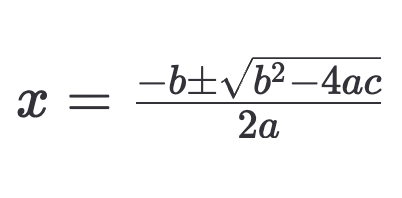
应表示为 `$$x = \\frac{-b \\pm \\sqrt{b^2 - 4ac}}{2a}$$`
default: false
T2AAudioSetting:
type: object
properties:
sample_rate:
type: integer
format: int64
description: 生成音频的采样率。可选范围`[8000,16000,22050,24000,32000,44100]`,默认为 `32000`
bitrate:
type: integer
format: int64
description: >-
生成音频的比特率。可选范围`[32000,64000,128000,256000]`,默认值为 `128000`。该参数仅对 `mp3`
格式的音频生效
format:
type: string
description: 生成音频的格式,`wav` 仅在非流式输出下支持
enum:
- mp3
- pcm
- flac
- wav
default: mp3
channel:
type: integer
format: int64
description: 生成音频的声道数。可选范围:`[1,2]`,其中 `1` 为单声道,`2` 为双声道,默认值为 1
force_cbr:
type: boolean
description: |-
对于音频恒定比特率(cbr)控制,可选 `false`、 `true`。当此参数设置为 `true`,将以恒定比特率方式进行音频编码。
注意:本参数仅当音频设置为**流式**输出,且音频格式为 `mp3` 时生效。
default: false
PronunciationDict:
type: object
properties:
tone:
type: array
description: |-
定义需要特殊标注的文字或符号对应的注音或发音替换规则。在中文文本中,声调用数字表示:
一声为 1,二声为 2,三声为 3,四声为 4,轻声为 5
示例如下:
`["燕少飞/(yan4)(shao3)(fei1)", "omg/oh my god"]`
items:
type: string
TimbreWeights:
type: object
required:
- voice_id
- weight
properties:
voice_id:
type: string
description: >-
合成音频的音色编号,须和weight参数同步填写。支持系统音色、复刻音色以及文生音色三种类型。系统支持的全部音色可查看
[系统音色列表](/faq/system-voice-id),也可使用 [查询可用音色
API](/api-reference/voice-management-get) 查询系统支持的全部音色
weight:
type: integer
format: int64
description: >-
合成音频各音色所占的权重,须与 voice_id 同步填写。可选值范围为[1, 100],最多支持 4
种音色混合,单一音色取值占比越高,合成音色与该音色相似度越高.
```json dark
"timbre_weights": [
{
"voice_id": "female-chengshu",
"weight": 30
},
{
"voice_id": "female-tianmei",
"weight": 70
}
]
```
minimum: 1
maximum: 100
VoiceModify:
type: object
description: |-
声音效果器设置,该参数支持的音频格式:
- 非流式:`mp3`, `wav`, `flac`
- 流式:`mp3`
properties:
pitch:
type: integer
description: >-
音高调整(低沉/明亮),范围 [-100,100],数值接近 -100,声音更低沉;接近 100,声音更明亮

minimum: -100
maximum: 100
intensity:
type: integer
description: >-
强度调整(力量感/柔和),范围 [-100,100],数值接近 -100,声音更刚劲;接近 100,声音更轻柔

minimum: -100
maximum: 100
timbre:
type: integer
description: >-
音色调整(磁性/清脆),范围 [-100,100],数值接近 -100,声音更浑厚;数值接近 100,声音更清脆

minimum: -100
maximum: 100
sound_effects:
type: string
description: |-
音效设置,单次仅能选择一种,可选值:
1. spacious_echo(空旷回音)
2. auditorium_echo(礼堂广播)
3. lofi_telephone(电话失真)
4. robotic(电音)
enum:
- spacious_echo
- auditorium_echo
- lofi_telephone
- robotic
securitySchemes:
bearerAuth:
type: http
scheme: bearer
bearerFormat: JWT
description: |-
`HTTP: Bearer Auth`
- Security Scheme Type: http
- HTTP Authorization Scheme: Bearer API_key,用于验证账户信息,可在 [账户管理>接口密钥](https://platform.minimaxi.com/user-center/basic-information/interface-key) 中查看。
To find navigation and other pages in this documentation, fetch the llms.txt file at: https://platform.minimaxi.com/docs/llms.txt